


Every learner has a way in. We help them find it.
Some learners need more time. Some need a challenge. Some need it in another language. FriskOL makes room for all of them, so nobody gets left behind in class.
Innovation
Learn with PhyLO and turn any lesson or question into a teaching moment

Access
The Free Plan allows everyone a chance to learn + FriskOL donates one subscription for every Paid subscriber

Support.
We build a learning ecosystem for parents and educators to support all learners



Learn your way
Practice on your own or get support from PhyLO, your homework buddy
Students

Create learning material
Tailor your lesson plans, assignments and quizzes to your students needs with one click.
Teacher/Tutors
Monitoring and homeschooling
Be a part of your student's learning journey.
Parents/Guardians
Students, parents, teachers and tutors share one platform to learn and to teach with guidance from our AI learning coach PhyLO. Adaptive formats support neuro-divergent learners.
One adaptive platform,
4 seats in the classroom.
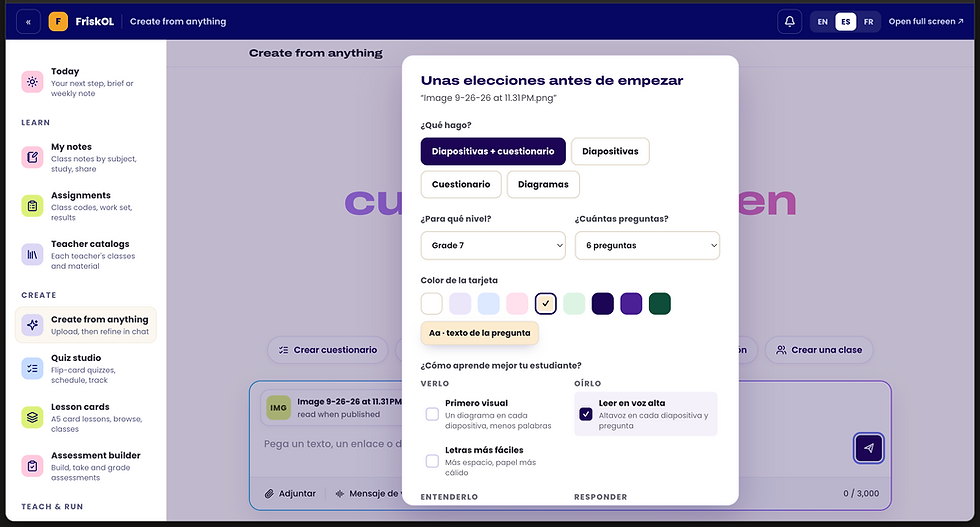
Select an adaptive learning mode.
Same question, three learning modes. FriskOL changes the reading load, timing, hints and read-aloud to fit each mode, without labels.


Access all main features or upgrade on a paid plan. Parental consent maybe required.
Sign up for free.
.png)
Meet PhyLO, your learning coach
Helps students and educators to organize their work, to teach or to learn
Learn or Teach in English or Spanish
Our bi-lingual platform welcomes all users in English or Spanish
Get Started
Signing up is easy and free!

Set up you account for free.
Plan courses, lessons, schedules, assignments, and learning goals in one place.

Make it fit each leaner
Students choose how they learn. Teachers set what adapts and what stays fixed. No labels.

Learn, teach and follow along
Lessons adjust to every learner, in English, French, Spanish and Portuguese.
Frequently asked questions


Be the First to Receive the Latest News
Use Cases
Study Methods
Learning Guide
Curriculum Alignment
Homeschooling
Flexible Study Schedule
Personalized Teaching
Adaptive Learning
Our Features
Ai Quizez
Personalized AI Tutor
Teaching Tools
Adaptive Classroom
HomeSchooling Tools
Oversight Dashboard
Online Tutoring

Jack


Can you please create a quiz for me from the screenshot and this pdf.


Add paragraph text. Click “Edit Text” to update the font, size and more. To change and reuse text themes, go to Site Styles. Add paragraph text. Click “Edit Text” to update the font, size and more. To change and reuse text themes, go to Site Styles.
Add paragraph text. Click “Edit Text” to update the font, size and more. To change and reuse text themes, go to Site Styles.
Add paragraph text. Click “Edit Text” to update the font, size and more. To change and reuse text themes, go to Site Styles. Add paragraph text. Click “Edit Text” to update the font, size and more. To change and reuse text themes, go to Site Styles.
Add paragraph text. Click “Edit Text” to update the font, size and more. To change and reuse text themes, go to Site Styles.
Scientific Discipline
Add paragraph text. Click “Edit Text” to update the font, size and more. To change and reuse text themes, go to Site Styles. Add paragraph text. Click “Edit Text” to update the font, size and more. To change and reuse text themes, go to Site Styles.
Add paragraph text. Click “Edit Text” to update the font, size and more. To change and reuse text themes, go to Site Styles.
Add paragraph text. Click “Edit Text” to update the font, size and more. To change and reuse text themes, go to Site Styles. Add paragraph text. Click “Edit Text” to update the font, size and more. To change and reuse text themes, go to Site Styles.
Add paragraph text. Click “Edit Text” to update the font, size and more. To change and reuse text themes, go to Site Styles.

Add paragraph text. Click “Edit Text” to update the font, size and more. To change and reuse text themes, go to Site Styles. Add paragraph text. Click “Edit Text” to update the font, size and more. To change and reuse text themes, go to Site Styles.
Add paragraph text. Click “Edit Text” to update the font, size and more. To change and reuse text themes, go to Site Styles.
Add paragraph text. Click “Edit Text” to update the font, size and more. To change and reuse text themes, go to Site Styles. Add paragraph text. Click “Edit Text” to update the font, size and more. To change and reuse text themes, go to Site Styles.
Add paragraph text. Click “Edit Text” to update the font, size and more. To change and reuse text themes, go to Site Styles.
.png)
.png)
.png)
